Ninekey – Retro Phone Launcher for Android
Dial up your apps. Skip the scroll.
Ninekey turns your home screen into a phone keypad. Type the first letters of an app and it opens, so you go straight to what you picked up the phone for.
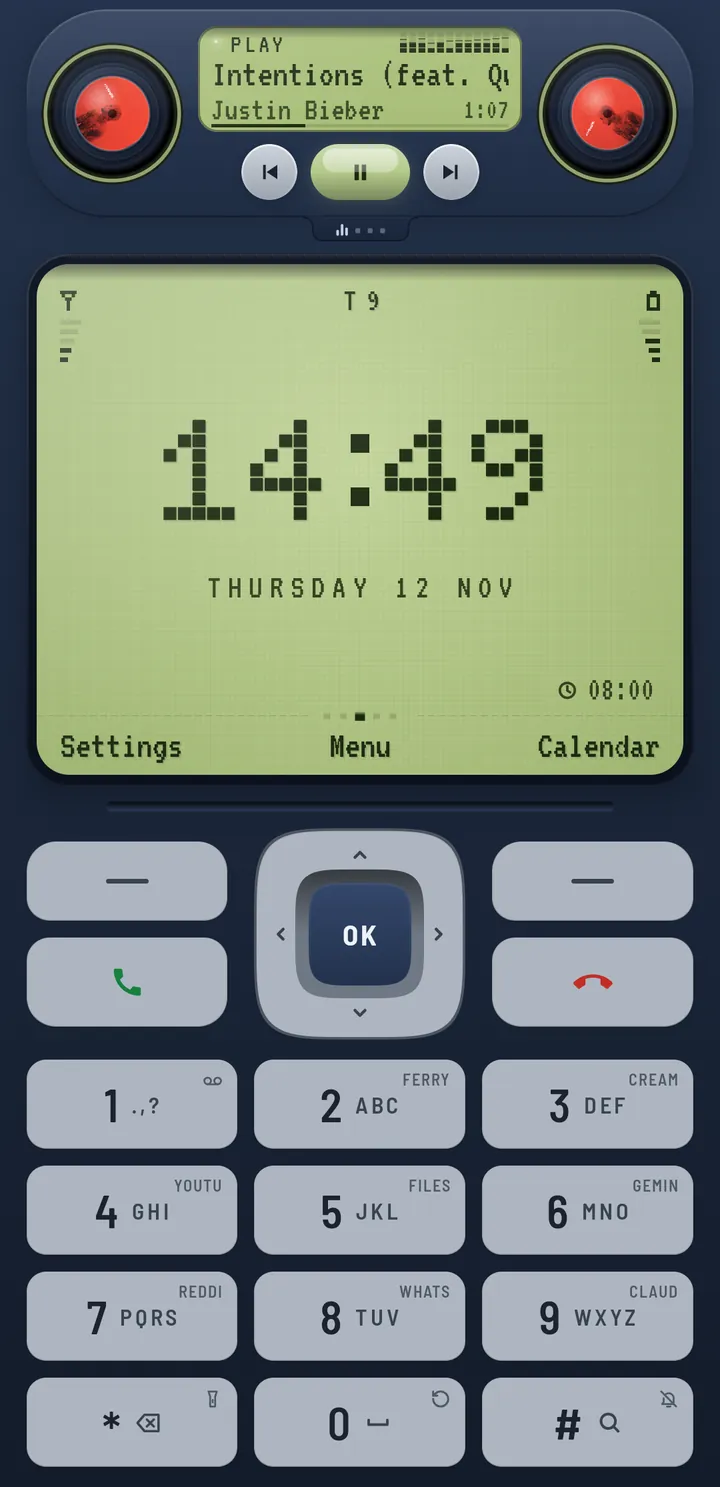
Try it right here
Tap the keys, or use the number keys on your keyboard. When only one app is left, it opens by itself.
home screen
Try 2-2-6 for Camera or 7-4-6-8 for Photos. The star key steps back.
Change the keypad's colour:
Open what you came for
A wall of icons is a wall of invitations. Ninekey shows a clock and a keypad instead. You decide which app you want, dial it, and you are there.
- The shelf can count down what is left of today, this month, this year, or a date of your own.
- A focus timer is built in, for when you would rather the phone helped than distracted.
- Speed dial: put favourite apps and people on the number keys.


Retro, and proud of it
A dot-matrix clock. Keys that click and thump under your thumb. A music deck that plays along as a turntable, a cassette, a CD player, a pair of speakers or twin VU meters.
- Tap the deck to play or pause, swipe it for the next song.
- Key sounds and haptics, as loud or as quiet as you like.
- Little touches everywhere, because a phone should be a bit of fun.


Three keys and you are in
Ninekey opens an app the moment only one name fits, so most apps are two or three presses away. Everything is tuned to feel instant, with animation that never makes you wait.
- 0 works as a space, so 6-9-0-3 finds My Files. Initials work too.
- It can match letters in the middle of a name, and search your contacts if you ask it to.
- Prefer a full keyboard? Switch the keypad to QWERTY.

Private by design
Ninekey never goes online. There is no account, no ads and no analytics. Anything it reads to do its job, like your app list or contacts, stays on your phone, and every permission is optional.
- Nothing is collected, so there is nothing to leak or sell.
- Premium themes are paid for through Google Play. We never see your card.
Read the privacy policy. It is short.
- Internet
- never
- Ads
- none
- Trackers
- none
- Account
- not needed
- Your data
- stays put
One shelf, many moods
The shelf sits at the top of the home screen. It stays slim until you pull it down, then shows a music deck or a quiet little widget. Swipe sideways to flip between them.


Dress it how you like
The Phone theme comes in nine colours and is free. Transparent and Steampunk are premium: buy one, or both together for less. One payment each, no subscription.


Nine colours, all free
Frost, Noir, Mono, Classic, Amber, Ice, Glass, Rose and Hi-Fi. Each one changes the screen, the keys and the music deck together. You can try them on the keypad above.


Transparent Premium
The whole face is one backlit screen. The keys and the music deck are drawn on it, in any hue you pick.
Steampunk Premium
Worn brass and gears. Ivory typewriter keys that clack, an open-heart watch with its balance swinging, a gramophone for your music, and gears that turn as you type.
Questions people ask
How do I set Ninekey as my default launcher?
Open Ninekey after installing it, go to its Settings, and choose to make it your home app. Android asks you to confirm: pick Ninekey.
You can also do it from your phone's own Settings: search for "Default home app" (on some phones it is under Apps, then Default apps) and pick Ninekey.
Can I go back to my old launcher?
Yes, at any time. Open your phone's Settings, search for "Default home app", and pick the launcher you had before. Uninstalling Ninekey also switches you back. Your apps and their data are never touched.
Does it need internet?
No. Ninekey never connects to the internet, so it works the same on a plane, in a tunnel or with data switched off. The apps you open with it use the internet just as they always did.
What do premium themes include?
Two themes: Transparent and Steampunk, each with its own keys, clock and music deck. You can buy either one on its own, or both together for less. Each is a one-time purchase through Google Play, with no subscription. The Phone theme and all nine of its colours are free.
How do I restore a purchase?
Purchases belong to your Google account, not to one phone. Install Ninekey on a phone signed in to the same Google account and your premium themes unlock again, without paying twice.
If they do not, email us and we will sort it out.
Ready when you are.
Ninekey is launching soon on Google Play, for Android phones.
Coming soon to Google Play com.quietwell.ninekey